
© Systems AXIS Limited,
2026.
axisfirst is a trading style of Systems AXIS Ltd. Head Office: AXIS House, 53/55 St Mary Street, Bridgwater, Somerset, TA6 3EQ. Registered Company 2370905 | VAT No. GB 515 8599 12
For many small and mid-sized businesses, the real challenge isn't enthusiasm, it compatibility. Older line-of-business (LOB) applications, tied to Remote Desktop Services (RDS) licensing, can make cloud migrations seem complex or even impossible. That's where Microsoft Azure Virtual Desktop (AVD) comes in.
Designed specifically for businesses that want to modernise without disruption, Microsoft Azure Virtual Desktop provides secure, cloud-based Windows 11 desktops and apps hosted on the Microsoft Azure cloud. It's the smarter way to upgrade your IT without replacing the systems you rely on.
Schedule a chat at a time to suit you and we can explore your needs.
[Call to action button - Book a time to chat with axisfirst]

Many SMEs still depend on older software that isn't designed for modern cloud platforms. These critical tools keep your business running but they can also keep you tied to a physical server or to virtual private networks (VPNs).
Azure Virtual Desktop for SMEs offers the flexibility to bring those applications into the cloud safely. It supports RDS-based software, meaning you can continue using your LOB tools while gaining the scalability and security of Azure cloud desktops. And, because AVD is part of the Microsoft 365 Business Premium ecosystem, you can often Bring Your Own License (BYOL), reducing costs and unnecessary complexity.
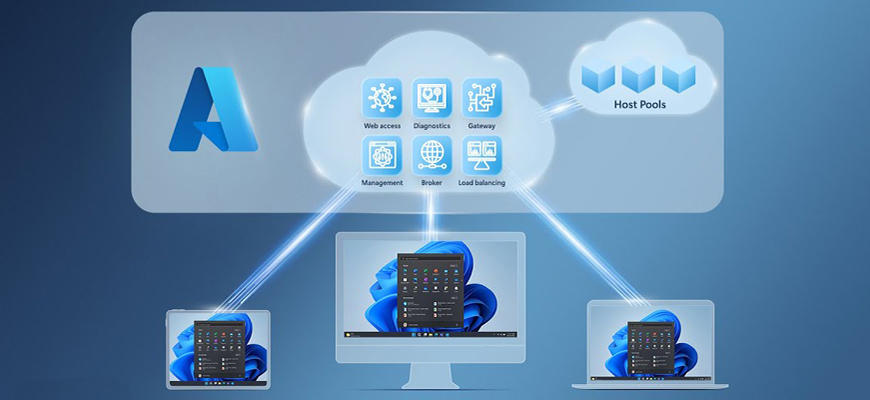
Use existing Microsoft 365 Business Premium cloud licenses to keep costs predictable and scalable.

Built on Microsoft Azure, with data encryption, compliance, and access control baked in.


Empower staff to work anywhere, on any device, without replying on on-premise servers.

Run RDS-based LOB applications seamlessly in a virtual environment.

No in-house required with Axis First. We mange configuration, deployment and ongoing support.
Get a guided demo and understand how it integrates with your current Microsoft 365 setup.
[Call to action button - Book a time to chat with axisfirst]
Cloud computing should not be complicated and AVD lets you modernise at your own pace, building flexibility, performance, and control. It's the ideal solution for businesses that:
If that sounds like you, Azure Virtual Desktop can give your team the same familiar Windows environment, but delivered securely from the cloud. [Hyperlink - Book a call] with our expert team to find out how.

At axisfirst, we help SMEs adopt cloud solutions without the jargon. We're an accredited Microsoft Solutions Partner which means our highly-trained specialists can manage everything from assessment and setup to user training and long-term support.
We'll ensure your apps, and desktops work seamlessly in Azure Virtual Desktop, giving you a smoother, faster, and more reliable way to work while saving you money in the long-run.
[Call to action button - Book a time to chat with axisfirst]
Let axisfirst help you move to Azure Virtual Desktop with minimal cost and zero disruption.
What is Microsoft Azure Virtual Desktop (AVD)?
Microsoft Azure Virtual Desktop (AVD) is a secure, cloud-based service that delivers full Windows 11 desktops and business applications from the Microsoft Azure Cloud.
How is AVD different from Windows 365?
Windows 365 and Azure Virtual Desktop seem similar, but they serve different needs. Windows 365 is a simplified Software as a Service (SaaS) solution ideal for straightforward use cases, not running legacy line-of-business apps that depend on Remote Desktop Server (RDS) licensing.
Can Azure Virtual Desktop run my existing legacy applications?
Yes. One of the biggest advantages of AVD for small business is its compatibility with older or bespoke software. If your business relies on applications tied to RDS licences, Azure Virtual Desktop allows you to keep using them in a secure, cloud-based environment.
Do I need new hardware or in-house IT to use Azure Virtual Desktop?
No. AVD runs entirely on the Microsoft 365 Business Premium cloud and is accessible from virtually any modern device — Windows, Mac, iOS, or Android.
How much does Azure Virtual Desktop cost for small businesses?
Costs depend on how many users and resources you need, but AVD offers affordable cloud desktops using Microsoft 365 licences on a pay-as-you-go model.
How secure is Azure Virtual Desktop for remote working teams?
Security is built in through Microsoft’s enterprise-grade encryption, conditional access, and multifactor authentication, as well as secure virtual desktops for remote working teams, which all help to keep your data safe.
How can axisfirst help with migration to AVD?
Our axisfirst Azure Virtual Desktop experts manage the entire process from assessment, deployment, licence optimisation, and ongoing support, so you can focus on running your company, not your IT.
How do I get started with Azure Virtual Desktop?
It’s easy. [Book a free 30-minute consultation] to discuss your setup. We’ll review your licences, software, and requirements, then show you how AVD supports RDS licensing requirements and improves flexibility for your team.

© Systems AXIS Limited,
2026.
axisfirst is a trading style of Systems AXIS Ltd. Head Office: AXIS House, 53/55 St Mary Street, Bridgwater, Somerset, TA6 3EQ. Registered Company 2370905 | VAT No. GB 515 8599 12